Show members or teachers on your own website
With the Ledenboek embed widget you put your members, teachers or trainers on your own site: as a list with photos and on a map. One line of code, and it adapts to your house style.
In short
You mark a group (for example "Teachers" or "Breeders") as public. Members in that group who make their profile public then appear in the widget on your own website. Only those opt-in profiles are shown, so privacy stays tidy.
Step by step
-
1
Make a group public
In Ledenboek, go to the group (for example Teachers) and switch on "allow public profiles".
-
2
Members make their profile public
Members in that group make their own profile public via the member portal — with a photo, short bio, town and optionally a website or booking link.
-
3
Copy the embed code
A ready-made embed code appears on the group page, with the right details already filled in.
-
4
Paste the code on your website
Paste the line on the page you want. Done. The widget automatically grows in height and shows your members as a list and on the map.
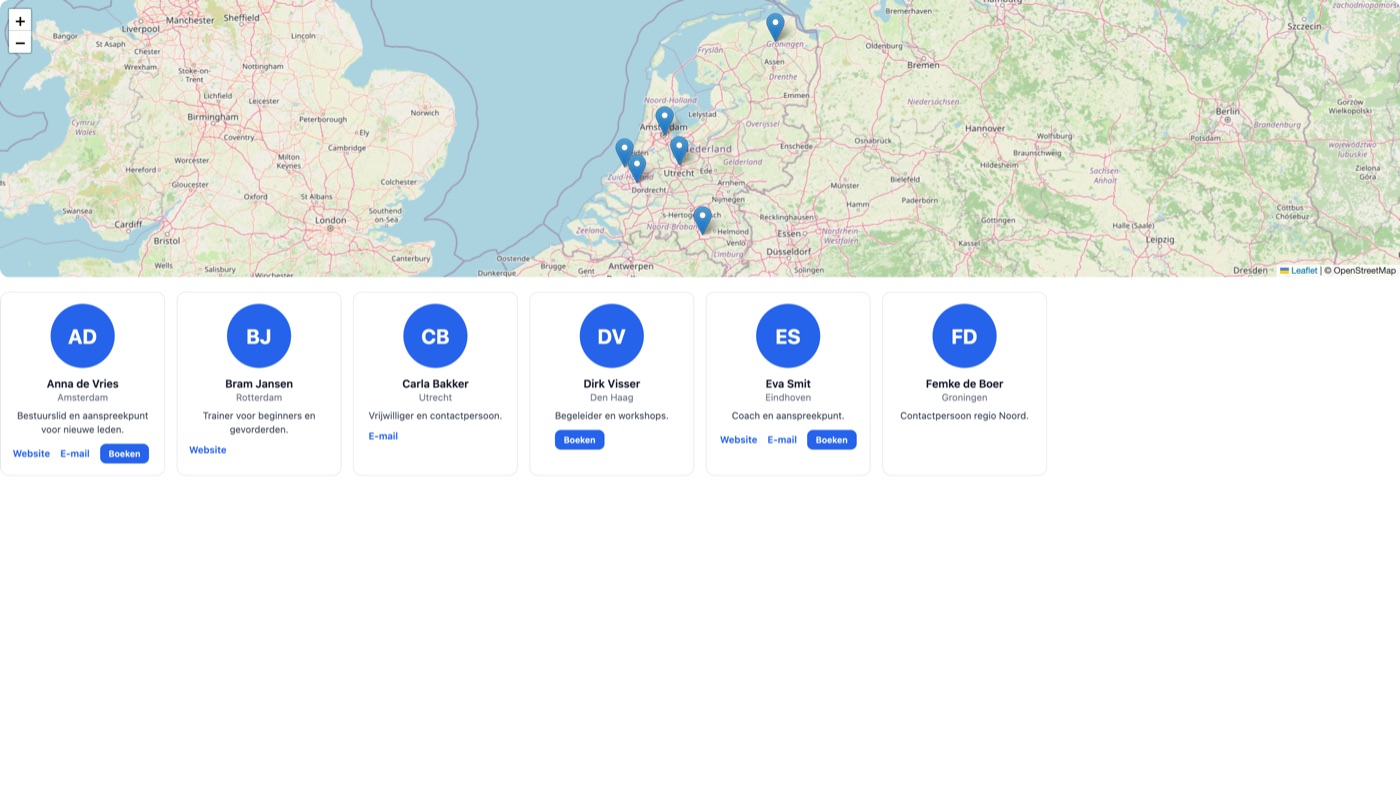
What it looks like on your site
Visitors see your members as clear cards and on a map, so they immediately find someone nearby. Each profile can show a website, email and booking link.
What the code looks like
<script src="https://ledenboek.nl/insluiten/embed.js"
        data-vereniging="jouw-vereniging"
        data-weergave="beide"></script>
Customisable with colour, style and columns. Want to start building before the profiles are filled in? Add data-demo="1" for sample data.